Food Safety App for U.S. Restaurants, Cafés, Food Trucks and Catering Businesses
Paper food safety records usually fail in the same places: during a busy lunch rush, at shift change, after a late delivery, or when a manager assumes someone else already did the check. The result is not just messy paperwork. It is missed temperature logs, incomplete cleaning records, weak allergen communication, and no clear proof of what actually happened when an inspector asks.
If you run a restaurant, café, deli, food truck, ghost kitchen, school kitchen, or catering business in the United States, you need a system that works in real service conditions. Staff need to know what to check, when to check it, and what to do when something is out of range. Managers need records that are easy to review, easy to find, and hard to forget.
This page is for food businesses that want a practical way to stay organized, keep daily food safety routines consistent, and replace paper logs with a faster digital system that supports inspection readiness, active managerial control, and day-to-day accountability.

Why paper food safety records break down in busy U.S. kitchens
Most food businesses do not struggle because they do not care about food safety. They struggle because paper relies on memory, spare time, and perfect follow-through. In real kitchens, none of those things are reliable every day.
- A line cook takes a grill temperature but forgets to write it down until the end of the shift.
- A delivery arrives while prep is behind, so receiving checks get skipped or recorded later from memory.
- An employee answers an allergen question based on what they think is in the dish, not the current recipe.
- A closing cleaner signs a sheet, but no one can tell whether the task was actually completed properly.
- A manager knows there was a fridge issue last week, but cannot quickly find what corrective action was taken.
Those are ordinary failures, but they create real risk. Food safety management works best when checks are quick to complete, easy to review, and built into the way the business already operates.
What food safety records most U.S. food businesses need every day
Most operations need a repeatable way to document the basics clearly and consistently. That usually includes:
- Cold holding, hot holding, cooking, cooling, and reheating temperature logs
- Opening and closing food safety checks
- Cleaning and sanitizing schedules
- Corrective actions when something goes wrong
- Employee training and refresher records
- Receiving checks for incoming deliveries
- Probe thermometer calibration checks
- Allergen information that staff can actually use
- Pest control observations and contractor visit notes
- Internal reviews to spot weaknesses before an inspection does
When these records are scattered across clipboards, folders, and bits of paper, the system becomes fragile. When they are all in one place and time-stamped at the point of use, managers can see what is complete, what is missing, and what needs follow-up.
A simple daily workflow for a busy kitchen
Before opening
- Check refrigeration and freezer units
- Confirm probe thermometer accuracy
- Review any unresolved issues from the previous shift
- Make sure handwashing, sanitizer, and cleaning supplies are ready
During prep and service
- Log cooking, reheating, cooling, and hot holding temperatures
- Record delivery checks as food arrives
- Capture defects and corrective actions when issues appear
- Keep allergen information easy for staff to check quickly
Before close
- Complete line cleaning and sanitation checks
- Confirm waste, storage, and labeling controls are in place
- Review whether any logs are incomplete
- Leave a clear handover for the next shift
The point is not to create more administration. The point is to make essential controls easier to complete properly and harder to miss.
How Food-Safety.app fits into that routine naturally
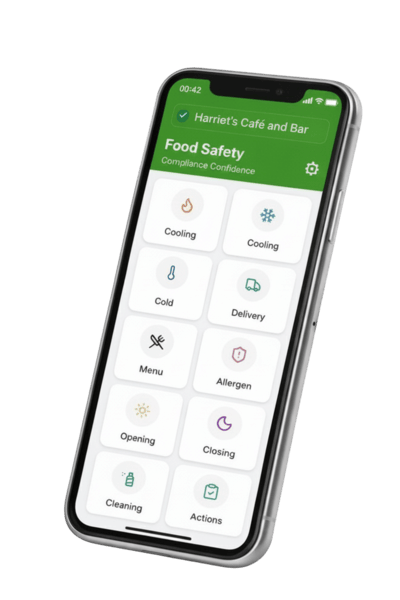
Food-Safety.app is a practical digital food safety management system for U.S. food businesses that want to replace paper records with a simpler daily process. Instead of relying on folders, printed sheets, and end-of-day guesswork, staff can log checks as they happen.
Temperature monitoring, cleaning and sanitation records, allergen information, opening and closing checks, training records, receiving checks, corrective actions, pest control notes, and maintenance tasks can all be recorded in one place. Entries are automatically time-stamped, easier to review, and ready to show when records are requested.
The app is especially useful for small and mid-sized businesses that need practical control without expensive hardware, overcomplicated dashboards, or a system that only works if the internet is perfect.
Real-world examples of where this helps
Example 1: Small neighborhood café
A breakfast and lunch café has three different people opening across the week. On paper, fridge checks are inconsistent because each person does them slightly differently. With a digital opening checklist, the manager can see whether the checks were completed, whether any unit was running warm, and whether action was taken before milk, cooked bacon, and prepared fillings drifted into an unsafe range.
Example 2: Food truck at events
A food truck works at fairs where signal is unreliable. Paper logs get greasy, lost, or left in the cab. Using offline digital records, the operator can still complete hot holding checks, delivery checks, and cleaning tasks during service, then export organized records later without trying to rebuild the day from memory.
Example 3: Multi-shift deli
A deli has frequent staff turnover and regular customer allergen questions. One employee updates a chicken salad recipe but forgets to tell everyone. A digital allergen record makes the latest information easier to check, reducing the risk of a staff member giving an outdated answer at the counter.
Example 4: Busy independent restaurant
A walk-in cooler begins running above normal temperature on a Friday night. Instead of a vague note on paper, the team logs the issue, records the product check, moves vulnerable stock, documents corrective action, and leaves a clear record for the manager and technician the next morning.
What you can record inside the app
Temperature monitoring records
Log cooking, cooling, cold holding, reheating, and hot holding temperatures in seconds. Clear, time-stamped entries make it easier to spot missed checks and show that controls were actually carried out.
Corrective actions and defects
When something goes wrong, you can record what happened, what was done, and whether it was resolved. That creates a more believable record than a perfect-looking paper file with no problems ever noted.
Cleaning schedules and sanitation records
Set daily, weekly, and deeper cleaning tasks and keep a clear record of completion. This helps managers move away from unsigned sheets and vague assumptions.
Opening and closing checks
Create checklists that match your operation, whether that means prep stations, sanitizer checks, line temperatures, or end-of-night storage routines.
Receiving and delivery checks
Record supplier deliveries, product condition, temperatures, and rejected items at the point food arrives, when those checks matter most.
Probe calibration
Keep a record of thermometer checks so staff can trust the readings they are relying on for cooking, cooling, and reheating decisions.
Allergen management
Keep menu allergen information together and easier to review, update, and share with staff. This supports more consistent communication when customers ask questions about ingredients.
Training records
Store inductions, refreshers, and coaching records in one place so managers can see who has been trained and where gaps still exist.
Pest control register
Record sightings, actions taken, and contractor visits so follow-up is easier and recurring issues are less likely to be ignored.
Food safety training videos
Short training content can support quick reminders and reinforce expectations in a format staff are more likely to use than a binder on a shelf.
AI-powered HACCP plan builder
Create HACCP flow charts for menu items and keep your hazard thinking connected to the checks and records staff complete every day.
Works without internet
The app can still be used where signal is poor or unreliable, which is useful for mobile operations, older buildings, basements, outdoor catering, and event setups.
Instant reports
Export PDF records when you need them instead of searching through clipboards, folders, or loose pages before an inspection or internal review.
Useful food safety guides
If you want to strengthen your wider food safety system, these guides are worth reading:
- What systems help run a safe food business?
- Deliveries and receipt of food
- How to write a HACCP plan
- Allergen management made practical
- Reducing cross-contamination in food safety management
- Food business internal audit tool
- Building a strong food safety culture in your kitchen
- Utensil control and cross-contamination risk
Frequently asked questions
Is this only for large food businesses?
No. It is especially useful for small and mid-sized operations that want a simpler, cheaper alternative to paper-heavy systems.
Can staff use it during service?
Yes. The point is to make records practical enough to complete during normal kitchen routines rather than leaving everything until the end of the day.
Does it replace every part of food safety management?
No app replaces management responsibility, staff supervision, or training. What it does is make checks, records, follow-up, and review much easier to manage consistently.
Can I use it without internet access?
Yes. That is useful for food trucks, event caterers, older buildings, and any setup where signal is unreliable.
When should I introduce a digital system?
The best time is usually before paper problems become normal. If your team already misses checks, loses forms, or scrambles for records before inspections, you are already late.