Learn how to build an allergen matrix for your menu and keep it accurate and safe.
Table of contents
What is an allergen matrix?
Definition
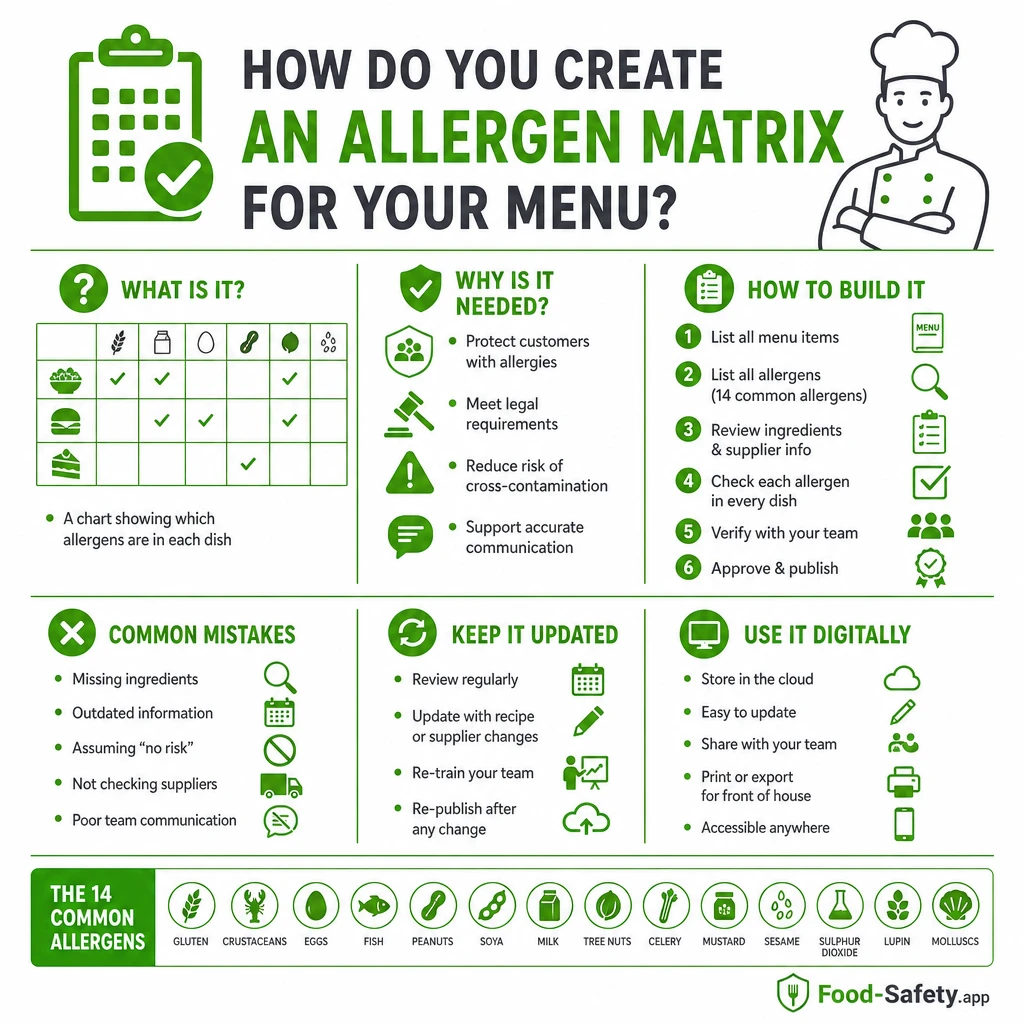
An allergen matrix is a straightforward table that lists every menu item alongside the allergens it contains. It clearly indicates items that contain, may contain, or are free from the 14 recognised allergens, helping staff make accurate disclosures at the point of service.
Practical use
In a commercial kitchen, the matrix acts as a single source of truth. It streamlines training, supports staff handovers, and makes it easier to respond to customer allergy queries during a busy service without rifling through messy notes. This approach aligns with Natasha’s Law for small food businesses.
Why you need an allergen matrix
Legal and safety benefits
Having a clear allergen matrix supports lawful food information requirements and aids inspection readiness. It reduces the likelihood of miscommunication between kitchen, service, and front of house, which is critical when a customer asks for allergen details. This approach also supports clear allergen labeling on packaged foods.
Operational confidence
When staff can reference a trusted document, they answer questions with confidence, speeding service and minimising cross-contact risks. The matrix also helps during shifts where team members come and go, ensuring consistent information even if a cook is away sick. For practical tips on stopping cross-contamination in service, see how to stop cross-contamination in service.
How to build an allergen matrix
Step 1: list every menu item
Include all items on the current menu plus specials, daily boards, and desserts. Don’t assume a dish is unchanged from last season—verify every item path.
Step 2: review every ingredient
For each item, examine all components: primary ingredients, sauces, garnishes, marinades, stock cubes, and any vendor-produced elements. Consider hidden sources like flavour enhancers or spice blends. For guidance on reducing cross-contact during preparation, see how to clean to reduce allergen cross-contact.
Step 3: mark allergens clearly
Use a simple legend for each item: Contains, May contain, or Not present. Flag all 14 recognised allergens in every row, updating as ingredients or suppliers change. Common allergens to check include milk, eggs, fish, crustaceans, tree nuts, peanuts, gluten-containing cereals, soy, sesame, sulphites, celery, mustard, lupin, and molluscs. For guidance on how changes affect allergen control, see menu changes that break allergen control.
Step 4: keep recipe control tight
Lock the matrix to a versioned document so changes are traceable. Include a last-updated date and the name of the responsible supervisor. Regularly review the matrix after supplier changes, menu rewrites, or stocking updates. For workflow guidance on records, how to complete the SFBB diary properly.
Tip: keep the legend simple and consistent. A small colour or symbol system can help staff scan quickly, but ensure it remains readable in print and on screens.
Common mistakes to avoid
- Forgetting supplier changes or ingredient substitutions that alter allergen content.
- Overlooking cross-contact risks during preparation, storage, or cooking.
- Relying on memory instead of written records for allergen details.
- Failing to update seasonal dishes and specials when ingredients shift.
Keeping it current
- Review after every recipe change and after new deliveries.
- Assign responsibility to one person or shift lead to own updates.
- Store version-controlled records so you can trace changes for audits or supplier reviews.
Digital use and practical tools
Digital storage of allergen details against menu items improves accessibility and audit readiness. Use a simple app or document system to link items to allergen data, enabling quick exports for training or inspections. Regularly back up records and verify access permissions so staff can view the latest version during service. For guidance on digital records, see what are digital food safety records and how do they help.
When you need to export for audits or staff briefings, ensure the export includes item name, ingredients, allergen status, and date of last update. This makes reviews swift and reduces the time spent answering questions during service.
Practical examples and scenarios
Consider these real-world prompts to test your matrix:
- A café updates its bread supplier. The bread contains gluten and possibly sesame traces. Update the matrix to reflect new allergen statuses for all affected menu items that use the bread.
- A pub chef adds a gluten-free dish. Check cross-contact controls in the kitchen, update the matrix to mark gluten-free items as appropriate, and review shared equipment practices.
- A caterer reviews a Christmas menu with multiple sauces and garnishes. Verify each component for allergens and adjust service notes to ensure staff can communicate clearly with guests.
Compliance and operation focus
Operational focus should prioritise accurate menu records, staff awareness and handover, and clear allergen communication at the point of service. Maintaining robust allergen information supports inspections and internal checks, and helps you demonstrate due diligence during reviews with auditors.
For practical workflow support, Food-Safety.app is a food safety management system for catering businesses.
If you want to learn more about official guidance on allergen information, consult trusted authorities such as the Food Standards Agency.
For reference, you can review their guidance on allergen information at
Food Standards Agency guidance on allergen information.
Learn more about allergen information
Explore practical guidance and tools to keep allergen information accurate across your menu and service, with practical steps you can implement today.